INDIA'S FIRST STUDENT-FRIENDLY OFFLINE IDE
A complete coding environment designed for school students, with offline programming tools.
Learn. Code. Build.
Compatibility
Windows 10 / 11 (64-bit)
Connectivity
100% Offline-First
Curriculum
Designed for Classes 6–12
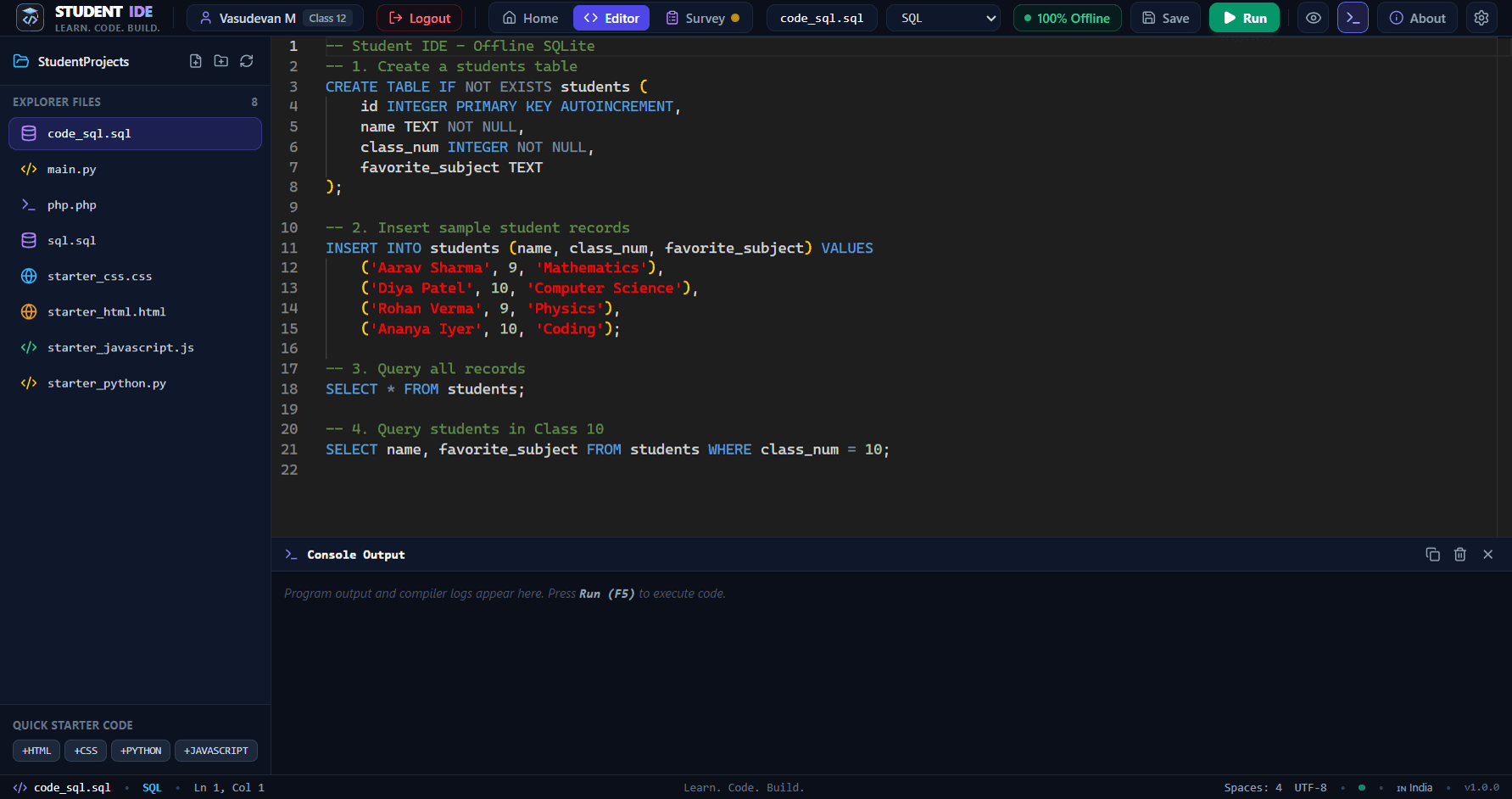
THE WAIT IS ALMOST OVER.
Student IDE is launching soon.
INDIA'S FIRST STUDENT-FRIENDLY OFFLINE IDE
A complete coding environment designed for school students, with offline programming tools.
Learn. Code. Build.
Everything Students Need to Start Coding.
Engineered specifically for school students, teachers, and computer laboratories — combining professional developer tools with zero-friction offline execution.
1. Offline Coding
Learn and write code without requiring an internet connection.
Engineered from the ground up for school computer laboratories and areas with limited connectivity. Write, run, and debug code with 100% offline compilers and runtimes.
2. Multiple Languages
Work with supported programming languages in one application.
Seamlessly transition between Python, C++17, HTML5, CSS3, JavaScript, SQL, and PHP. Standard school curriculum workflows without switching between multiple fragmented tools.
3. Professional Code Editor
Monaco-based editor with syntax highlighting and developer-friendly tools.
Powered by the industry-standard Monaco Editor engine. Features rich syntax highlighting, code bracket matching, line numbering, auto-indentation, and configurable font sizing.
4. Built-in Terminal
Run programs and view output in one workspace.
Integrated execution console displays standard output, compiler diagnostics, and formatted runtime errors. Supports interactive user inputs for Python, C++ cin, and PHP stdin.
5. Student Dashboard
A simple, organized workspace for school students.
A friendly launchpad displaying student name, grade level, one-click starter templates, language quick-starts, recent workspace files, and helpful coding tips.
6. Local Project Management
Create, open and manage coding projects locally.
Full local file tree explorer. Create, rename, edit, and organize project folders directly on your local computer disk with zero dependency on cloud servers.
7. Student Feedback
Built-in survey and feedback features.
Integrated educational feedback module enabling students to share learning impressions, report experience ratings, and submit anonymous classroom evaluations offline.
8. Admin Dashboard
Local survey analytics and export/import features.
Password-protected instructor dashboard with PBKDF2/scrypt security, grade-wise satisfaction metrics, offline CSV export, and encrypted JSON lab-sync capabilities.
Zero Cloud Dependencies • 100% Student Privacy Preserved
Student code, profiles, and survey feedback are stored strictly on local computer disks inside a protected SQLite database.
Supported Programming Languages
Pre-configured with standalone offline compilers and runtimes. No complex environment setup, PATH configurations, or internet downloads required.
Beginner-friendly language for scripting, data logic, and mathematics.
Tested Capabilities & School Syllabus Support:
Accuracy & Transparency Note: All runtime tools listed above are packaged and embedded directly into the Windows x64 release package (Student-IDE-Setup-1.0.0-x64.exe). The standalone PHP 8.2 CLI runtime is bundled alongside MinGW GCC 14.1 and Python 3.11 with zero required external downloads.
Designed for School Students
From foundational logic to advanced algorithms, Student IDE removes configuration hurdles so students and teachers can focus entirely on learning to code.
Middle School
Student IDE removes intimidating command lines and complex toolchain setup, allowing young learners to experience immediate creative gratification.
Curriculum Syllabus Focus:
- •Introduction to algorithmic thinking and computer logic
- •HTML5 structural webpage design and form controls
- •CSS3 visual styling, colors, borders, and typography
- •Basic JavaScript arithmetic, variables, and alerts
How Student IDE Helps:
- Simple one-click launch with no installation barriers
- Instant visual feedback via real-time Sandboxed Web Preview
- Safe, distraction-free environment without web browser ads
High School
Specifically aligned with Indian CBSE (Skill Subject 402/417) and ICSE Computer Applications curricula to ensure students excel in practical exams.
Curriculum Syllabus Focus:
- •Python programming fundamentals, conditional logic & loops
- •Strings, lists, tuples, and dictionary manipulation
- •Modular programming with user-defined functions
- •Basic file input/output and practical school projects
How Student IDE Helps:
- Pre-bundled Python 3.11 runtime eliminates Python PATH errors
- Integrated terminal supports interactive input() without popup windows
- Built-in project templates to start assignments in seconds
Senior Secondary
Equips senior school students with standard C++17 compilation, relational SQL databases, and backend scripting needed for board exams and engineering entrance.
Curriculum Syllabus Focus:
- •C++17 object-oriented programming, classes & memory pointers
- •Data structures: arrays, stacks, queues, and searching algorithms
- •SQL relational tables, foreign keys, joins, and aggregates
- •PHP backend scripting and modular data processing
How Student IDE Helps:
- Bundled MinGW-w64 GCC 14.1 compiler provides instant C++ execution
- Embedded SQLite database handles SQL practical queries locally
- Process watchdog prevents computer freeze on accidental infinite loops
Why Offline-First Matters in Indian Schools
Many school computer laboratories face slow, filtered, or intermittent internet connectivity. Typical cloud-based coding platforms lag, require student phone numbers or email logins, and expose children to external advertisements.
Student IDE solves this completely: a single lightweight download equips school machines with full C++ compilers, Python interpreters, Monaco code editing, and SQLite databases. No student accounts, no online trackers, and no subscription fees.
Every compiler and runner executes locally on the student machine.
Instant launch without requiring emails, passwords, or telephone numbers.
Ready-to-run template files for CBSE and ICSE classroom assignments.
Clean, distraction-free environment dedicated solely to computer education.
See Student IDE in Action
Genuine captures of the desktop application interface. No mockups or invented visuals — this is the real, production-tested software installed on student PCs.
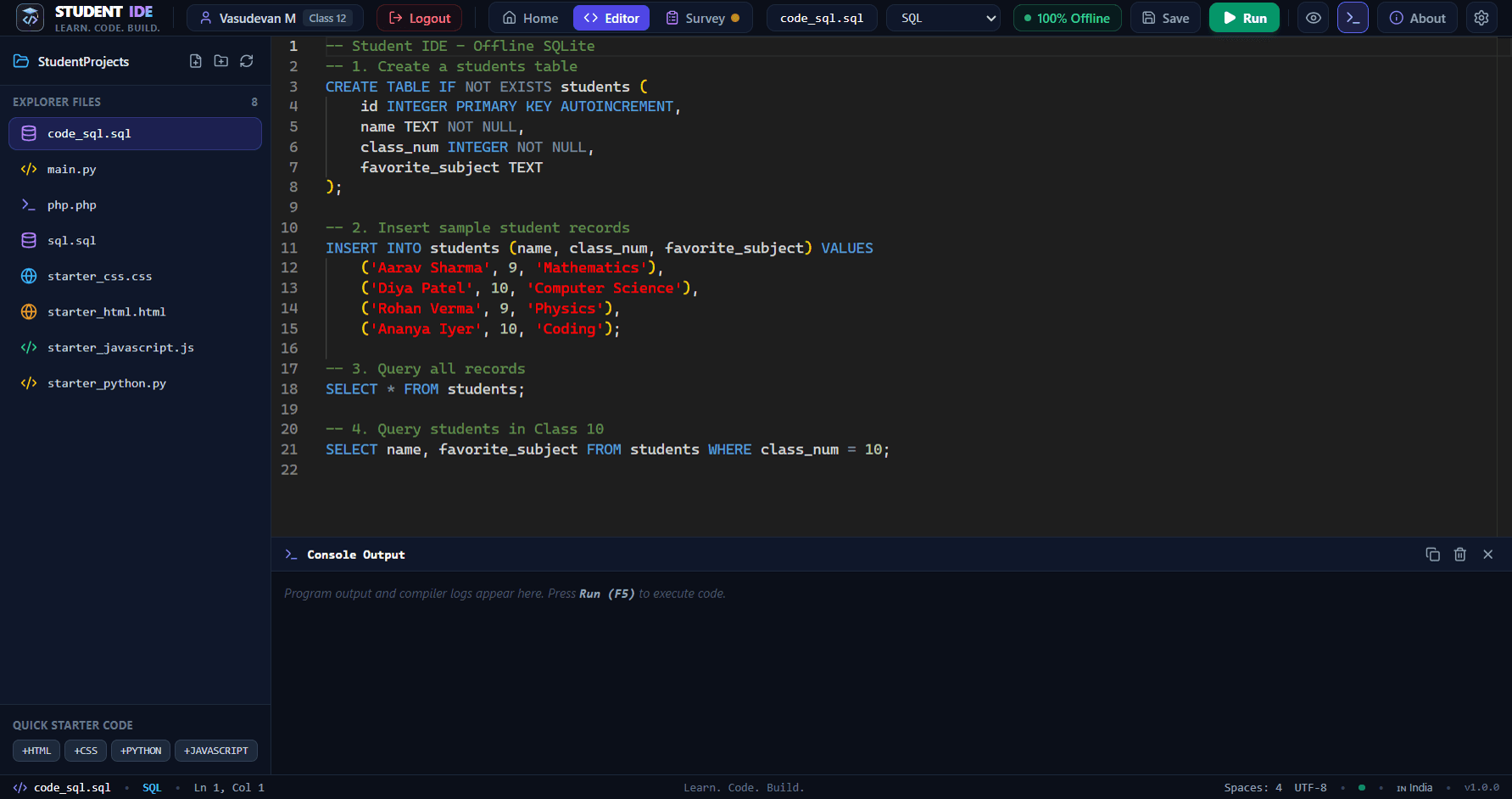
Professional Code Editor
Monaco-powered editing environment with syntax highlighting
The primary coding workspace leverages Monaco Editor — the same engine powering modern industry tools. Students benefit from syntax highlighting, line numbers, automatic bracket pairing, and clean dark mode ergonomics designed to protect young eyes during long laboratory sessions.
Start Your Coding Journey Today.
Download Student IDE for Windows and begin building your programming skills in a distraction-free, 100% offline environment.
The official Windows installer (Student-IDE-Setup-1.0.0-x64.exe) is being deployed to CDN distribution mirrors for the official launch on 2 November 2026 at 10:00 AM IST.
Cryptographic SHA-256 Checksum
Verify the integrity of your download to ensure an authentic, unmodified installer package.
544ee8da3007b95e46e8df44d46e9575000163f149b2960dae4f4fd78e58bcaaGet-FileHash -Algorithm SHA256 .\Student-IDE-Setup-1.0.0-x64.exeSimple Step-by-Step Installation
Get up and coding in less than 2 minutes on any Windows laptop or computer lab machine.
Download
Click “Download for Windows” to save Student-IDE-Setup-1.0.0-x64.exe to your machine.
Run Setup
Double-click the installer. Standard user permissions (asInvoker) are sufficient; no UAC admin prompt required.
Choose Folder
Accept the default per-user installation path or pick your preferred destination drive. Shortcuts will be created automatically.
Start Coding
Launch Student IDE, enter your name and grade level, pick your languages, and start creating programs with 100% offline compilers!
Information for School Computer Laboratory Administrators:
Student IDE is portable-friendly. You can copy the single installer file to a USB thumb drive or school network share and install it across all lab machines without needing internet access on any workstation.
Answers for Students, Parents & Teachers
Everything you need to know about Student IDE, system compatibility, offline functionality, and laboratory deployments.
Student IDE is a complete, lightweight, student-friendly desktop integrated development environment created specifically for Indian school students (Classes 6–12), teachers, and computer laboratories. Developed by DeveloperHut, it bundles the code editor, compilers, and runtimes needed for school curricula into a single offline installer.
Have questions about deploying Student IDE in your school or computer lab?
Reach out to our founder and education team at founder@developerhut.in
Built to Make Coding Accessible.
The story and purpose behind Student IDE — engineering educational software that works for every Indian student, regardless of internet connectivity.

Student IDE
Developed by DeveloperHut
In computer laboratories across India, students often face hurdles before writing a single line of code: environment variables fail, internet bandwidth is restricted or absent, cloud editors time out, and software requires student phone numbers or complex permissions.
DeveloperHut created Student IDE to dismantle these roadblocks. By bundling industry-standard Monaco Editor, MinGW-w64 GCC, Python 3.11, and SQLite into an autonomous desktop package, students can learn in any classroom without depending on external connectivity.
Our guiding principle is simple: every child in Classes 6–12 deserves access to high-quality programming tools that respect their privacy, require zero subscription fees, and just work.
Our Product Tagline
Learn. Code. Build.
A simple three-step progression: learn computer fundamentals, code with hands-on practice, and build creative projects that solve real problems.
Commitment to Truth
We present Student IDE exactly as built. We do not invent certifications, commercial awards, user counts, or fake testimonials. All advertised features are backed by real codebase tests and verified installers.
Founder & Inquiries
founder@developerhut.in